August 2026
August '26 Release Notes
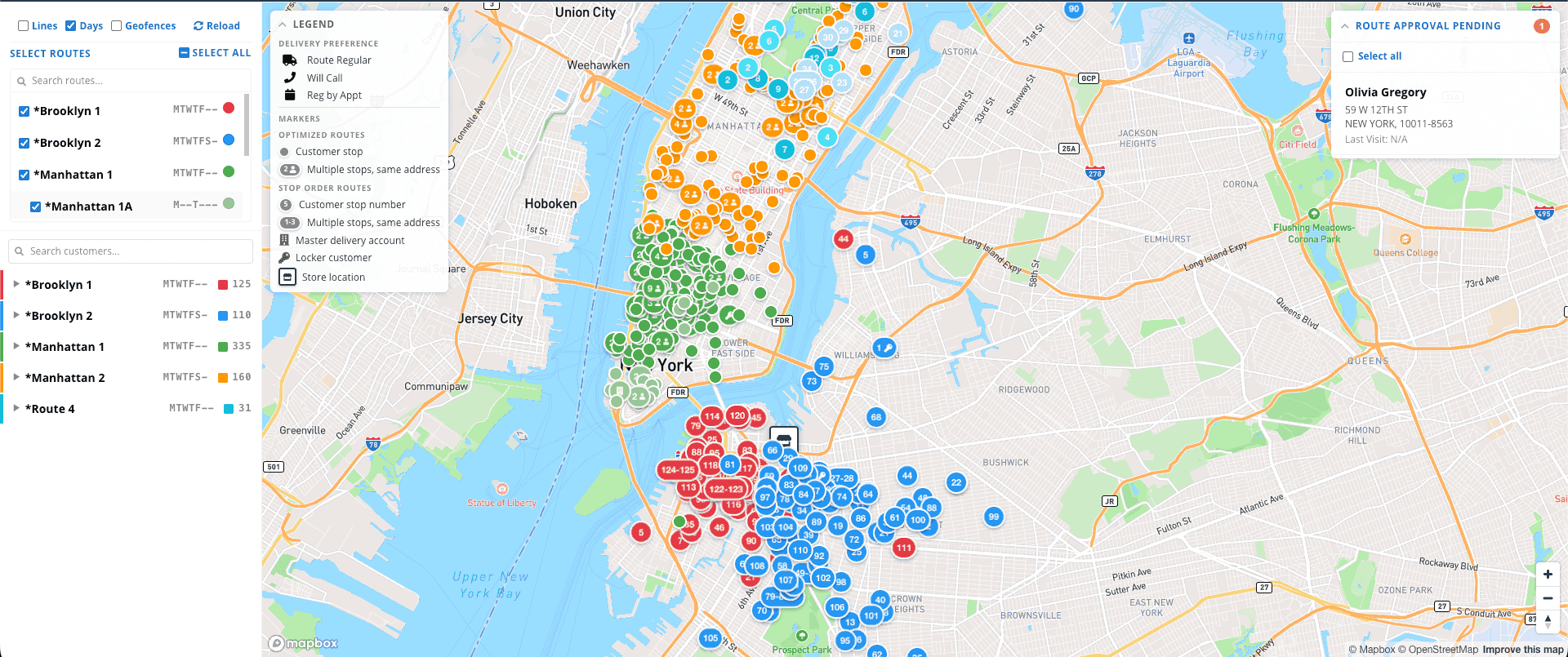
Route Overlay Feature
The Route Overlay is a map-based workspace for visualizing and managing delivery routes. It provides a view of all your routes on a map alongside a customer stop list, giving route managers a single place to review route coverage, spot gaps, and make adjustments.
Access it from Settings → Delivery → Route Overlay.
Full guide can be found here: Route Overlay
Labor Efficiency Report
Labor Efficiency turns your time-clock hours and payroll rates into a single at-a-glance picture of how much each part of the plant costs to run — and how productive it is. One screen answers "where is my labor money going, and is each department pulling its weight?"
Where: Reports → Production → Labor Report · Who: Admins only (it shows wages)
You can find a full guide on the report here: Labor Efficiency Report
Before entering employee wages make sure all employees with the Admin Level should actually have it. You can filter your employee list by Level (not department!) in the Employees page.

MORE IN THIS RELEASE

Metalprogetti
Half Bag Option in the Ticket Splitting Config
New Kiosk UI for European MP Kiosks
Add Due Date Filter to Storage Conveyor Bulk Unload
Automatic Transfer from MP Dispatch to MP Storage
Send a separate order "Kiosk order ready" SMS template for kiosk orders.
Send Locker location in the D command to MP for lockers - allows cleaner to open locker via SMRT
Setting on MP Storage Rack to only receive data for specific stores - prevents orders from Store 1 being loaded onto a Kiosk at Store 2.
Add Metalprogetti minimum numeric barcode length setting - allows for MP to scan barcodes with leading zeroes without reconfiguring the MP scanner

Reporting
Add 'Date of Entry' to 'All Bags' Inventory Table
You can now Favorite default reports and add them to Tags / Dashboards
Add Piece Count to Incoming Summary
Outgoing Summary report to mirror the Incoming Summary but for Outgoing
Create a Default Location Pickup History Report - Pickups from location X between Y dates
Deposits report now lists agents even if they aren’t assigned to a Merchant
Disputes / Chargeback Report and Alerts
Report UI Improvements
In the default report pages we now freeze the filters from the top of the page so you don’t have to scroll up and down to change the filters for a report not at the top of the page.
Viewing reports from a dashboard now open in a lightbox for a better UX

Customer Portal
Uploads for Terms of Service & Privacy Policy in Settings
When Terms of Service & Privacy Policy are present customer portal signups must agree to them via a checkbox.
Group delivered orders by delivery in the Orders page.
Communication Preferences page for customers to select how they want to be reached via automated messages.
Customers can now see their credit balance in the customer portal.

Promos
Ability to copy a promotion.
Display who and when a promotion’s settings were changed.
Search box for promotions.

Lockers
Clearer language on the customer portal when scheduling a locker pickup.
Allow customers to schedule pickups from multiple lockers.
New setting to require customer to pay for their orders before receiving their locker number. The delivery completion text tells the customer they need to pay via the included account link before receiving their locker number and code.

Pickup & Payments
Beta: Merge Pay Claim and Void Payment into a single button with next steps deciding whether you are only returning money to the client or reversing the payment entirely.
Payment Box Default Amount = Due Balance for Statement Customers.
Pickup list filters and groups by store.
Retail Order Checkout Improvements
Improve payment warnings from Stripe so the counter staff at the dry cleaner can understand them.

Delivery Manifests
You can now see a history of all delivery manifests that you generate and send for each customer and delivery day.
New delivery manifest modes that summarize by item type and breakdown the GST/VAT
COMING SOON
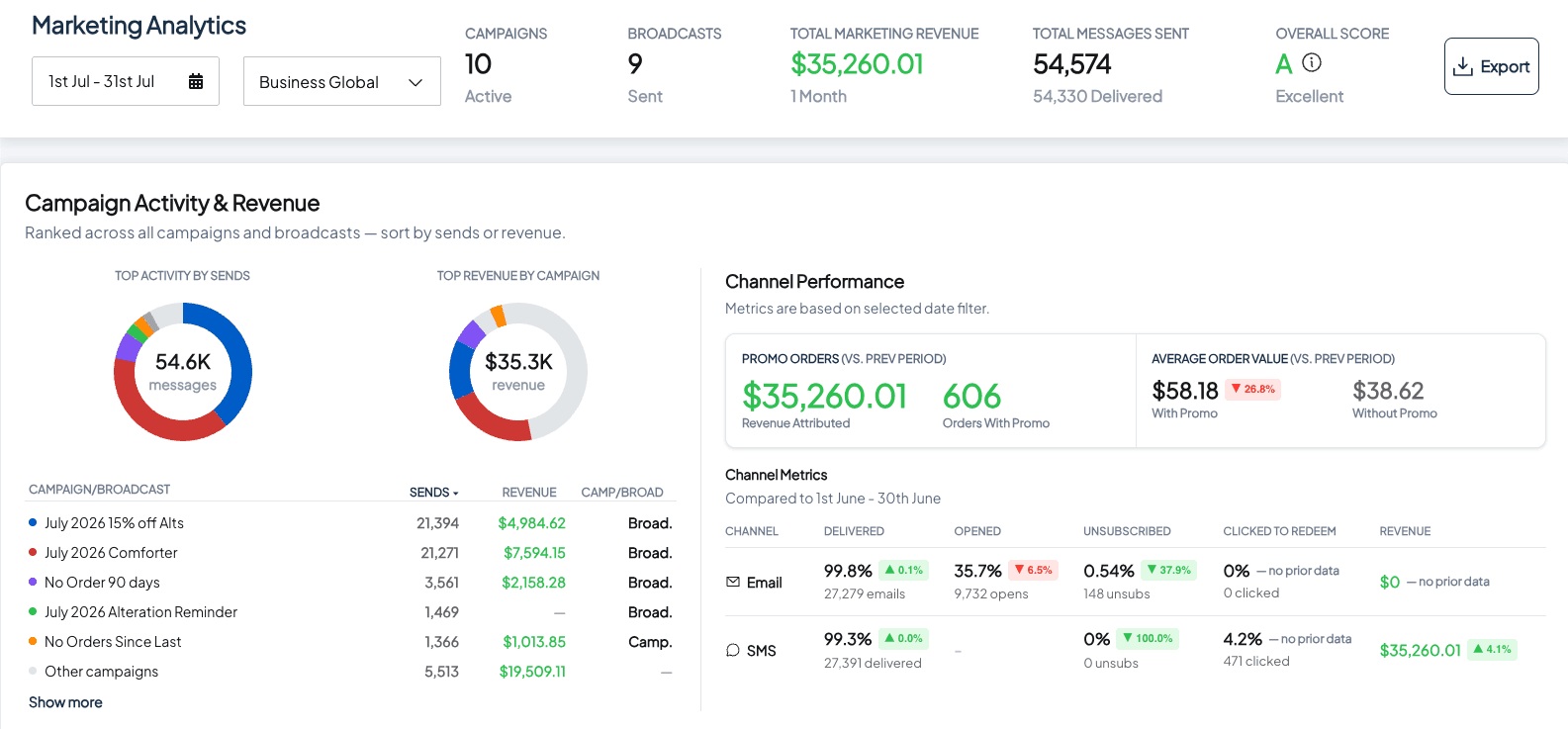
New Marketing Dashboard
Marketing Analytics now live inside SMRT. Campaign and broadcast performance, promotion redemption, and customer insights. Metrics pull from your live SMRT data and cover all connected stores, so owners and marketing staff can see how each campaign performed in one place.
Miscellaneous
Employees page improvements.
More filters
Search
Cleaner UI for adding a new employee
Added an agent filter to the Item Search page.
When transferring barcodes include the destination customer in the note.
Recent Customers page now has a Store and Event filter.
Assisted Assembly more clearly displays the piece count information.
Customer History tab now loads the last 100 orders. Faster load time for large accounts.
Beta: Max number of stops per route per day setting.
Power Use Navigation - Hit CMD+K on Mac or CTRL+K on Windows to launch a fast navigation search box.
SMRT Support staff can now log into your stations without TeamViewer once approved by the end user. This allows our support staff to more quickly provide support.
Rename the Dup button in the item menu to “Additional HSL”
Show Active/Pending Customers When Disabling a Subscription Item Type
Allow texting international numbers.
Fiscalization for Germany, Slovenia, and Saudi Arabia.
Settings
Setting to automatically change the agent of an order when you change the return location of the order.
Settings search box in System Settings and Customer Settings.
Setting to not display the store or route on the assembly tickets / invoices.
Setting to remove pricing from the item info ticket.
Send Receipt on Autopay can now be configured at the customer level.
When scheduling a delivery for a will call customer with the Schedule Will Call Deliveries On Due Date setting enabled, we now only wait for a single to ticket to be assembled rather than the entire order.
Setting to show items with tax inclusive prices on receipts.
You can now configure the ticket receipt footer at the store level.
Statements / Invoices
Ability to specify a business tax number at the customer level and display that tax number on Statements / Invoices - EU B2B Compliance.
Improved clarity on statements for what was billed during the current period.
Setting for when an order enters AR. By default this was always when the order was ready. Now you can select Ready, Returned, or Invoiced.
Statement of Accounts - New document type showing invoice summary with outstanding amounts. This only works if you bill via Invoice.
Sales Tax / VAT can now be backed out from the Invoice / Statement total rather than made up by the line items. This eliminates rounding discrepancies between the total amount and the applied tax versus the tax rate.